How to Monitor n8n Workflow Costs and Optimize LLM Spend
Understanding Per-Unit Costs
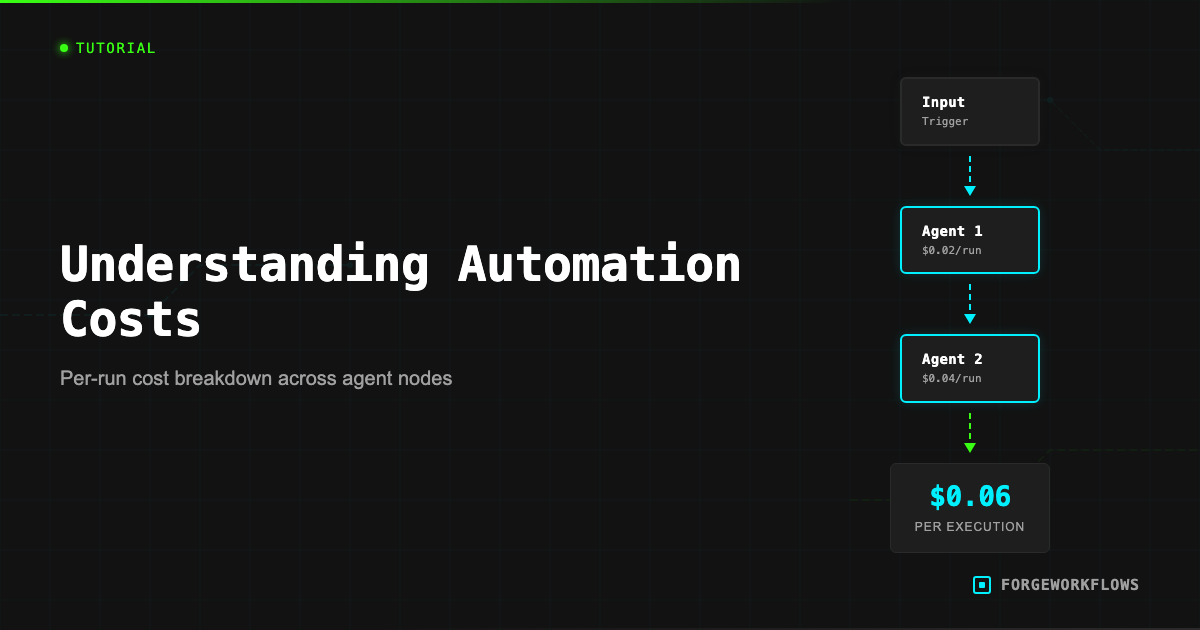
Every ForgeWorkflows Blueprint has an ITP-measured per-execution cost listed on its product page. This number represents the total Anthropic API cost for one complete run of the pipeline - all agent calls, all tokens, all tiers combined. It is not an estimate; it is a measurement from the Inspection and Test Plan testing process.
Per-execution cost varies by Blueprint complexity. A 3-agent pipeline with one reasoning-grade LLM call might cost $0.02 per run. A 6-agent pipeline with multiple Tier 1 Reasoning calls might cost $0.12 per run. The product page breaks this down so you can see exactly where the cost is distributed across agents.
To calculate your monthly spend:
Monthly cost = per-execution cost x executions per month
For example: the CRM Data Decay Detector runs weekly. At 4 executions per month, multiply the per-execution cost by 4. The Buying Signal Detector might run daily - multiply by 30.
This calculation covers only Anthropic API costs. Infrastructure costs (n8n hosting, CRM subscriptions) are separate and typically fixed. The Blueprint product page lists estimated monthly infrastructure costs under the Prerequisites section.
ITP-measured means the cost was recorded during structured testing with real API calls, not estimated or projected. The number on the product page reflects actual token consumption.
Anthropic Dashboard
The Anthropic developer console at console.anthropic.com is your primary tool for monitoring LLM spend. Here is what to look at:
- Usage tab: Shows daily and monthly token consumption, broken down by model. You can see exactly how many input and output tokens your workflows consumed.
- Billing tab: Shows your current billing period charges, payment method, and usage limits.
- Rate limits: Shows your current tier and the corresponding rate limits (requests per minute, tokens per minute). If your workflows are hitting rate limits, this is where to check your tier.
Monitoring cadence depends on how many Blueprints you are running. If you are running a single Blueprint weekly, a monthly billing check is sufficient. If you are running 5+ Blueprints daily, check the usage tab weekly to catch any unexpected spikes.
Unexpected cost increases usually trace to one of three causes:
- Increased execution frequency. Someone changed a daily trigger to hourly.
- Larger input data. If your CRM grew from 100 to 1,000 contacts, a Blueprint that processes all contacts per run will cost 10x more.
- Prompt changes that increase output length. Modifying a prompt to request more detailed analysis increases output tokens, which increases cost.
Cost-Saving Patterns
Three architectural patterns can reduce your Anthropic API spend without sacrificing output quality:
1. Conditional routing (pre-filter before the expensive call).
Many Blueprints include a lightweight classification step before the main reasoning step. For example, the Email Intent Classifier uses a fast classification model to categorize emails before sending high-intent ones to a deeper analysis agent. If 70% of your emails are low-intent, this architecture skips the expensive reasoning call for those records - saving 70% of what a naive "analyze everything" approach would cost.
If your Blueprint does not have a pre-filter and you are processing high volumes, consider adding an IF node that checks a simple condition (e.g., deal value > $10K) before the reasoning agent node. This is a straightforward n8n modification.
2. Tiered model assignment.
ForgeWorkflows Blueprints assign reasoning tiers to each agent. Tier 1 Reasoning models handle nuanced judgment calls. Classification-tier models handle simpler sorting and tagging tasks. This tiered approach means you only pay for heavy reasoning where it actually matters.
If you are customizing prompts and find that an agent assigned to Tier 1 Reasoning is doing relatively simple work (e.g., formatting output rather than making judgment calls), you might reassign it to a lower tier. Be cautious: test thoroughly, as reasoning quality may degrade on tasks that appear simple but have subtle edge cases.
3. Batch consolidation.
Instead of running a Blueprint once per record (e.g., one execution per new lead), batch multiple records into a single execution. Some Blueprints are designed for batch processing already. For those that are not, you can add an n8n "aggregate" step that collects records over a time window and feeds them as a batch to the pipeline. This reduces the per-record overhead of prompt preambles and system instructions.
The most effective cost optimization is pre-filtering. If you can skip the expensive reasoning call for 50% of records with a simple IF condition, you halve your Anthropic spend on that Blueprint.
Batch vs. Real-Time
The choice between batch processing and real-time processing has a direct impact on costs, and the right answer depends on your use case.
Real-time (webhook-triggered): The Blueprint fires immediately when an event occurs - a new form submission, a deal stage change, a Slack message. Each event is one execution. Cost is proportional to event volume. Use real-time when speed of response matters - for example, the Inbound Lead Qualifier scores leads within minutes of submission, which matters for follow-up timing.
Batch (schedule-triggered): The Blueprint fires on a schedule (daily, weekly) and processes all accumulated records in one or a few executions. Cost is proportional to schedule frequency, not event volume. Use batch when timeliness is measured in hours or days - for example, the Expansion Revenue Detector runs weekly because expansion signals do not require minute-level response times.
If you are running a real-time Blueprint and your event volume is high (100+ events per day), calculate whether the per-event cost justifies real-time processing. In many cases, a batch run every 4 hours gives you "close enough to real-time" response times at a fraction of the cost.
To convert a real-time Blueprint to batch: replace the webhook trigger with a schedule trigger, add an n8n node that queries your source system for new records since the last run, and feed the results into the existing pipeline. The Blueprint README notes when this conversion is feasible.
Tracking Monthly Spend
A simple tracking system keeps costs visible and prevents surprises:
- Create a cost tracking spreadsheet. List each active Blueprint, its ITP-measured per-execution cost, execution frequency (daily/weekly/per-event), and calculated monthly cost. Update monthly with actual Anthropic billing data.
- Set a monthly budget. Decide how much you are willing to spend on Anthropic API fees across all Blueprints. A reasonable starting point for a team running 3-5 Blueprints is $50-200/month.
- Configure Anthropic usage alerts. In the Anthropic console, set a monthly spending limit or alert threshold. This prevents runaway costs if a Blueprint trigger misconfiguration causes excessive executions.
- Review quarterly. Each quarter, compare your actual spend against the value delivered. If a Blueprint costs $30/month in API fees but saves your team 10 hours/month at $50/hour loaded cost, the ROI is clear. If the math does not work, adjust the execution frequency or deactivate the Blueprint.
For teams running multiple Blueprints, the Anthropic dashboard usage breakdown by day helps you correlate cost spikes with specific Blueprint executions. n8n execution logs show you exactly when each workflow ran, so you can cross-reference timestamps.
Cost optimization is not a one-time task. As your team adds more Blueprints and your data volume grows, revisit your cost tracking monthly to catch trends early.
Set an Anthropic monthly spending alert at 120% of your expected budget. This gives you early warning before costs escalate beyond plan.
Frequently Asked Questions
How much does it cost to run an n8n workflow with LLM calls?+
Cost depends on the model tier and input/output token volume per execution. A typical ForgeWorkflows blueprint processes 2,000-8,000 tokens per run. At current Anthropic pricing, that ranges from $0.01 to $0.15 per execution depending on the model selected.
Can I reduce LLM costs without sacrificing output quality?+
Yes. Conditional routing lets you send simple tasks to smaller, cheaper models and reserve larger models for complex reasoning steps. ForgeWorkflows blueprints with tiered model support include this routing logic built in.
How do I track per-execution costs in n8n?+
n8n logs execution metadata including token counts when available. You can also monitor spend directly in the Anthropic console under Usage. For granular tracking, some blueprints include a cost-logging node that writes per-run token counts and estimated cost to a spreadsheet or database.